How to Use AI to Write 1,000-Word Blog Posts in 10 Minutes (That Google Actually Likes)

Ever Feel Like Writing a Blog Post Takes Forever?
A few years ago, writing a blog post felt like running a marathon.
I’d sit down with a cup of coffee, open a blank document, and tell myself, “Today I’ll finally publish that article I’ve been thinking about all week.”
Then something strange would happen.
I’d spend 20 minutes researching. Another 30 minutes organizing ideas. Then I’d rewrite the introduction three different times because none of them felt right.
Before I knew it, three or four hours had disappeared.
And the article still wasn’t finished.
If you’re a blogger, freelancer, niche site owner, or content creator, you’ve probably experienced something similar.
Writing isn’t usually the problem.
It’s everything around the writing.
Researching topics.
Creating outlines.
Finding examples.
Structuring the article.
Optimizing for SEO.
Editing awkward sentences.
Making sure the content actually helps people.
That’s where AI has changed the game.
But not in the way most people think.
The internet is full of videos promising that AI can write entire articles with one click. Just enter a prompt, copy the output, publish it, and watch the traffic roll in.
Unfortunately, that’s rarely how things work in real life.
Most one-click AI articles sound exactly like what they are: machine-generated content.
They feel flat.
They repeat themselves.
They lack personality.
And readers can often tell within seconds.
Google is getting better at recognizing helpful content, too. The search engine isn’t interested in whether a human or AI created the first draft. What matters is whether the content solves a problem and provides genuine value.
That’s why the smartest bloggers aren’t using AI to replace themselves.
They’re using it to remove the slow, repetitive parts of content creation while keeping their own knowledge, experiences, and opinions at the center.
The result?
Better content.
Faster publishing.
More consistency.
And far less time staring at a blank page.
In this guide, I’ll show you exactly how to use AI to create a solid 1,000-word blog post in around 10 minutes without sacrificing quality, trust, or SEO performance.
Why So Many Bloggers Are Turning to AI
When AI writing tools first appeared, many writers were skeptical.
Some feared AI would replace content creators.
Others assumed the technology would produce low-quality articles that nobody would want to read.
The reality turned out to be somewhere in the middle.
AI isn’t replacing good writers.
It’s making good writers more productive.
Think about it this way.
Imagine hiring an assistant who could instantly:
- Brainstorm 50 blog ideas
- Create article outlines
- Suggest headlines
- Summarize research
- Rewrite awkward paragraphs
- Generate FAQ sections
- Help optimize content for SEO
That’s essentially what AI does.
The difference is that it can perform those tasks in seconds.
I know bloggers who used to publish one article per week because writing took so much time.
After learning how to use AI properly, they’re publishing three or four quality articles during the same period.
Not because the content became worse.
Because the process became faster.
And when you’re trying to grow a blog, consistency matters.
A lot.
What Google Really Thinks About AI Content

One of the biggest questions bloggers ask is:
“Can AI-written content rank on Google?”
The short answer is yes.
But there’s an important detail many people miss.
Google doesn’t rank content because it was written by AI.
And it doesn’t automatically reject content because AI was involved.
Google rewards content that helps users.
That’s it.
If someone searches for a question and your article provides the best answer, your content has a chance to rank.
If your article is vague, repetitive, inaccurate, or clearly created just to target keywords, rankings become much harder.
Think about your own experience.
Have you ever clicked on a search result that sounded promising only to discover it was full of generic advice you’ve already read a hundred times?
Most people leave immediately.
Google notices those signals.
That’s why EEAT has become so important.
Google wants content that demonstrates:
Experience
Real-world knowledge and firsthand insights.
Expertise
A clear understanding of the topic.
Authoritativeness
Evidence that the creator knows what they’re talking about.
Trustworthiness
Accurate information readers can rely on.
AI can help create the structure.
But your experiences, examples, and insights are what make the content trustworthy.
And that’s exactly where many bloggers gain a competitive advantage.
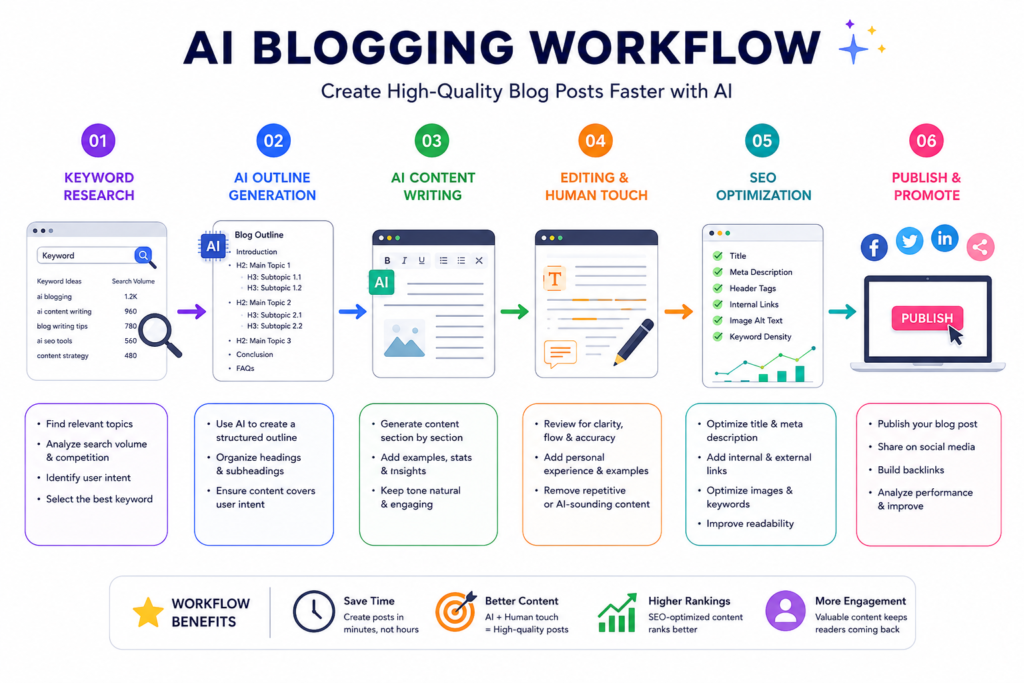
The 10-Minute AI Blogging Workflow
Now let’s get practical.
Here’s the process that can dramatically reduce the time it takes to create a blog post.
Step 1: Start With Search Intent
Before opening any AI tool, ask yourself one question:
What is the reader actually trying to accomplish?
Let’s look at two examples.
Keyword #1:
“Blogging”
Keyword #2:
“How to start a blog for free”
The second keyword reveals much more about the reader’s goal.
They want instructions.
They want a beginner-friendly process.
They may also want affordable options.
The clearer the intent, the easier it becomes to create useful content.
Many SEO failures happen because writers focus on keywords instead of people.
Always start with the problem the reader wants solved.
Step 2: Use AI to Build a Better Outline
This step alone can save enormous amounts of time.
Instead of immediately asking AI to write the article, ask it to create a detailed outline first.
For example:
“Create a detailed outline for an article titled ‘How to Start a Blog for Free.’ Include beginner questions, practical steps, and FAQ ideas.”
Within seconds, you’ll have a framework.
Now you’re not staring at a blank page anymore.
You’re working from a roadmap.
And writing becomes much easier.
Step 3: Generate Sections One at a Time
This is where most people make a mistake.
They ask:
“Write a 1,000-word article about blogging.”
The result is usually mediocre.
Why?
Because AI performs much better when given smaller, specific tasks.
Instead, work section by section.
For example:
“Write a 250-word section explaining how beginners should choose a blogging niche. Use conversational language and include practical examples.”
The output becomes more focused.
More useful.
And far easier to edit.
Think of AI as a co-writer rather than an autopilot system.
The more guidance you provide, the better the result.
The Secret Ingredient Most AI Articles Are Missing
Here’s something I noticed after reading hundreds of AI-generated articles.
Most of them aren’t technically wrong.
They’re just forgettable.
You finish reading and think:
“Okay… but what was the point?”
The information is there, but there’s no personality behind it.
No real experience.
No lessons learned.
No moments that make you feel like a real person wrote it.
That’s why adding your own perspective matters so much.
For example, when I first started using AI for blogging, I made the mistake many beginners make.
I generated entire articles with a single prompt and published them with only minor edits.
The content looked polished.
The grammar was perfect.
Everything seemed fine.
But the articles barely attracted traffic.
And when visitors did arrive, they rarely stayed.
The problem wasn’t the writing quality.
The problem was that the articles sounded exactly like hundreds of other articles online.
There was nothing unique about them.
Once I started adding personal observations, examples, and practical experiences, things changed.
Readers spent more time on the page.
Articles felt more useful.
And most importantly, the content started feeling like it belonged to a real human instead of a machine.
That’s the difference many bloggers miss.
AI can provide information.
You provide the perspective.
How to Make AI Content Sound Human
If you’ve ever read an article and instantly thought, “This was definitely written by AI,” you’ve already noticed some common patterns.
AI tends to:
- Over-explain simple ideas
- Repeat similar points
- Use overly formal language
- Avoid strong opinions
- Sound emotionally flat
The good news is that fixing these issues doesn’t take much time.
Write Like You’re Talking to One Person
Imagine you’re explaining something to a friend over coffee.
You wouldn’t say:
“Content optimization significantly improves search engine visibility.”
You’d probably say:
“A few small SEO improvements can make it much easier for people to find your article on Google.”
Same idea.
Much more natural.
Whenever you edit AI content, ask yourself:
“Would I actually say this in a conversation?”
If the answer is no, rewrite it.
Add Small Personal Observations
You don’t need dramatic stories.
Simple observations work surprisingly well.
For example:
“One thing that surprised me when I started blogging was how often shorter articles outperformed longer ones. Sometimes readers just want a quick answer.”
Statements like this make content feel authentic.
They also demonstrate experience, which helps support EEAT principles.
Use Realistic Examples
Generic advice is easy to ignore.
Specific examples are memorable.
Instead of writing:
“Choose a profitable niche.”
Try:
“For example, a blog about ‘fitness’ is extremely broad. A blog focused on home workouts for busy moms is much more specific and easier to grow.”
Readers instantly understand the point.
That’s what good content does.
It makes ideas easy to visualize.
My Favorite AI Prompt Framework for Blog Writing
Most people blame AI when the output isn’t great.
In reality, poor results often come from poor prompts.
Think of AI like a new employee.
If your instructions are vague, the work will probably be vague too.
Here’s a simple framework that consistently produces better results.
Step 1: Give Context
Tell AI:
- Who the audience is
- What problem they’re facing
- What tone you want
- The goal of the article
Example:
“You are an experienced blogger writing for beginners who want to start a side hustle. Use conversational language, practical examples, and actionable advice.”
Immediately, the output becomes more focused.
Step 2: Request Real Examples
Many AI articles become generic because the prompt never asks for examples.
Instead, say:
“Include realistic examples and beginner-friendly explanations.”
The difference can be dramatic.
Step 3: Ask for Human Revisions
After generating a section, use a second prompt.
For example:
“Rewrite this section to sound more conversational, add natural transitions, and remove robotic language.”
This extra step often improves readability significantly.
A Real-World Example of the 10-Minute Process
Let’s imagine you’re creating an article called:
“Best Side Hustles for Beginners.”
Here’s how the workflow might look.
Minute 1: Research the Topic
Identify the primary keyword.
Look at what readers are searching for.
Check related questions.
Minute 2: Create an Outline
Ask AI to generate a detailed structure.
Review it.
Remove unnecessary sections.
Add any ideas of your own.
Minutes 3–5: Generate Core Content
Create each section separately.
Focus on usefulness rather than word count.
Minute 6: Write the Introduction
This is where human input matters most.
Start with a relatable problem.
Share a quick observation.
Create curiosity.
Minute 7: Add FAQs
Generate common questions readers might ask.
Answer them clearly.
Minute 8: Add Personal Insights
This step is often the difference between average content and memorable content.
Add:
- Lessons you’ve learned
- Mistakes you’ve made
- Results you’ve seen
- Opinions based on experience
Minute 9: Edit for Flow
Remove repetitive phrases.
Simplify awkward sentences.
Improve transitions.
Minute 10: Optimize SEO Elements
Create:
- SEO title
- Meta description
- Internal links
- Image suggestions
And you’re done.
Not a rough draft.
A genuinely useful article.
Common AI Blogging Mistakes That Hurt Rankings
Let’s talk about some mistakes I see repeatedly.
Publishing Without Editing
This is probably the biggest one.
AI-generated drafts should never be treated as finished content.
Always review:
- Facts
- Statistics
- Examples
- Claims
- Formatting
A quick edit can dramatically improve quality.
Chasing Word Count Instead of Value
Many bloggers believe longer automatically means better.
It doesn’t.
A useful 1,200-word article will usually outperform a weak 3,000-word article.
Focus on solving the reader’s problem.
Everything else comes second.
Writing for Search Engines Instead of Humans
SEO matters.
But readers matter more.
If people enjoy your content, stay longer, and engage with it, that’s good for SEO anyway.
Write for humans first.
Optimize second.
Sounding Like Everyone Else
The internet already has enough generic content.
Your experiences are what make your content different.
Don’t hide them.
Use them.
SEO Tips for AI-Assisted Blog Posts
Once your article is written, spend a few extra minutes improving its SEO.
Use Related Keywords Naturally
Instead of repeating the same keyword endlessly, include related phrases.
For this topic, examples include:
- AI content creation
- AI blogging tools
- SEO writing
- Content marketing
- Blog writing workflow
- Search intent
- AI content strategy
Natural language almost always works better than forced keyword repetition.
Improve Readability
Most readers skim before they commit to reading.
That’s why readability matters.
Use:
- Short paragraphs
- Bullet points
- Clear headings
- Simple language
- Practical examples
If an article feels easy to read, people stay longer.
Add Internal Links
Internal links help readers discover more content and strengthen your website structure.
For example, this article could link to:
- How to Start a Blog in 2026
- Best AI Tools for Bloggers
- Beginner’s Guide to Keyword Research
- How to Make Money Blogging
- On-Page SEO Checklist
- Content Marketing Tips for Small Websites
These links improve user experience and support SEO.
Frequently Asked Questions
Can AI-written blog posts rank on Google?
Yes. Google evaluates content based on usefulness, quality, and user satisfaction rather than whether AI helped create it.
Is AI replacing bloggers?
Not really.
The bloggers seeing the best results use AI as a productivity tool while keeping their expertise and creativity at the center of the process.
How much editing should AI content receive?
Ideally, every article should be reviewed and improved before publishing. Add examples, insights, and personal experiences whenever possible.
What’s the biggest mistake people make with AI blogging?
Publishing raw AI output without adding any unique value.
Do I need expensive AI tools?
Not necessarily.
Many bloggers achieve excellent results using affordable or even free AI tools combined with strong editing and content strategy.
How often should I publish blog posts?
Consistency matters more than frequency.
One high-quality article every week is often better than publishing low-quality content every day.
Final Thoughts: AI Works Best When It Works With You
AI has completely changed how content is created.
Tasks that once took hours can now be completed in minutes.
But after experimenting with AI writing tools, reading countless articles, and watching how successful bloggers use them, I’ve noticed one thing.
The best-performing content still feels human.
It has personality.
It has stories.
It has opinions.
It has real experiences behind the words.
AI can help you create outlines, generate drafts, brainstorm ideas, and speed up the entire writing process.
What it can’t fully replace is your perspective.
And that’s actually good news.
Because your experiences, lessons, successes, and mistakes are what make your content different from everyone else’s.
So don’t think of AI as a replacement for blogging.
Think of it as a powerful assistant that helps you spend less time on repetitive tasks and more time creating content that genuinely helps people.
Use AI for speed.
Use your experience for depth.
Combine the two, and you’ll be able to create blog posts faster without sacrificing the quality that readers—and Google—actually care about.