Canva vs. AI Design Tools: Which One Actually Saves You Time?
If you’re creating graphics every week, you could be wasting hours without even realizing it. The rise of AI design tools promises one-click designs, instant social media posts, and automated branding—but does that mean Canva is becoming obsolete?
The answer isn’t as simple as “AI is better.” Depending on your workflow, one tool could save you minutes while the other saves you hours.
What You’ll Learn
If you’re a beginner blogger, content creator, freelancer, or side hustler, choosing the right design tool can dramatically improve your productivity.
In this guide, you’ll discover:
- Whether Canva or AI design tools save more time
- The strengths and weaknesses of each
- Which tool works best for different tasks
- How to combine both for maximum efficiency
- A simple workflow you can start using today
Let’s find the best option for your content creation process.
What Is Canva?
Canva is an easy-to-use graphic design platform that lets anyone create professional-looking designs without advanced design skills.
It’s popular because it offers:
- Thousands of templates
- Drag-and-drop editing
- Brand kits
- Social media scheduling
- Presentation and document creation
- Video editing
- Magic Studio AI features
For many creators, Canva has become the all-in-one design workspace.
What Are AI Design Tools?
AI design tools use artificial intelligence to generate graphics, layouts, illustrations, presentations, and marketing materials automatically.
Popular examples include:
- Microsoft Designer
- Adobe Express AI
- Ideogram
- Midjourney
- ChatGPT + image generation
- Leonardo AI
Unlike traditional design software, these tools often start with a simple text prompt.
Instead of designing manually, you describe what you want, and AI generates it in seconds.
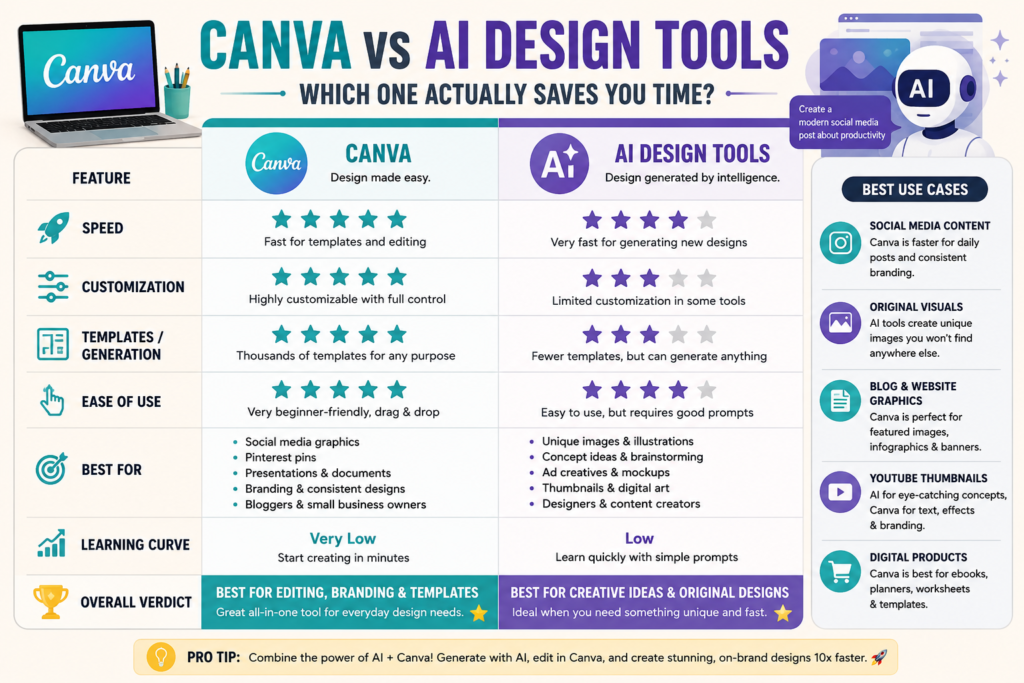
Canva vs. AI Design Tools: Side-by-Side Comparison
| Feature | Canva | AI Design Tools |
|---|---|---|
| Ease of Use | ⭐⭐⭐⭐⭐ | ⭐⭐⭐⭐ |
| Templates | Excellent | Limited |
| AI Generation | Good | Excellent |
| Customization | Excellent | Moderate |
| Branding | Excellent | Good |
| Learning Curve | Very Low | Low |
| Speed for Social Media | Excellent | Excellent |
| Original Graphics | Moderate | Excellent |
The Bottom Line
If your work involves editing existing templates, Canva is usually faster.
If you’re creating completely new visuals from scratch, AI design tools often save more time.
When Canva Saves More Time
There are many situations where Canva is still the fastest option.
1. Social Media Posts
Need Instagram posts every day?
Choose a template, change the text, replace the image, and you’re done.
No prompt engineering required.
2. Pinterest Pins
Pinterest creators love Canva because it includes:
- Vertical templates
- Brand colors
- Fonts
- Easy resizing
- Bulk creation
You can produce multiple pins in under 30 minutes.
3. Blog Graphics
Need:
- Featured images
- Infographics
- Comparison charts
- Checklists
Canva makes these incredibly easy.
When AI Design Tools Save More Time
AI tools shine when creativity is the bottleneck.
Creating Original Images
Instead of searching stock photo websites for 20 minutes, type:
“Minimal workspace with laptop, coffee, green plants, soft lighting.”
You’ll receive unique images within seconds.
Brainstorming Concepts
AI can generate:
- Thumbnail ideas
- Logo concepts
- Product mockups
- Book covers
- Ad creatives
This is especially useful when you don’t know where to start.
Fast Visual Experiments
Want five completely different versions?
AI can create them almost instantly.
Practical Example: Designing a Blog Featured Image
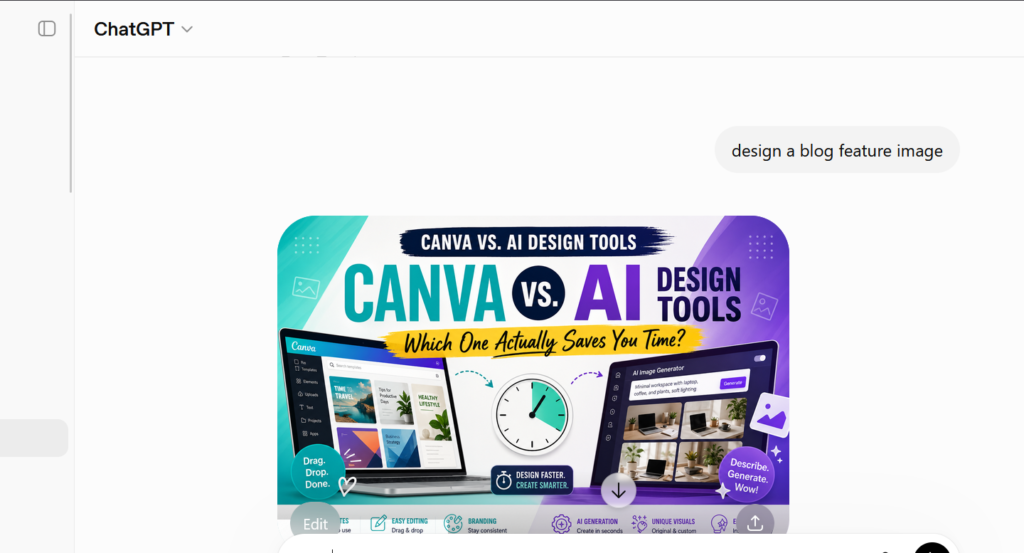
Let’s compare the process.
Using Canva
- Search “Blog Featured Image”
- Pick a template
- Replace headline
- Swap image
- Change colors
- Download
Time: 10–15 minutes
Using an AI Design Tool
- Write a prompt
- Generate images
- Choose the best result
- Edit if needed
- Export
Time: 3–8 minutes
However, if the AI output isn’t quite right, you may spend extra time refining prompts.
The Smartest Workflow: Combine Canva and AI
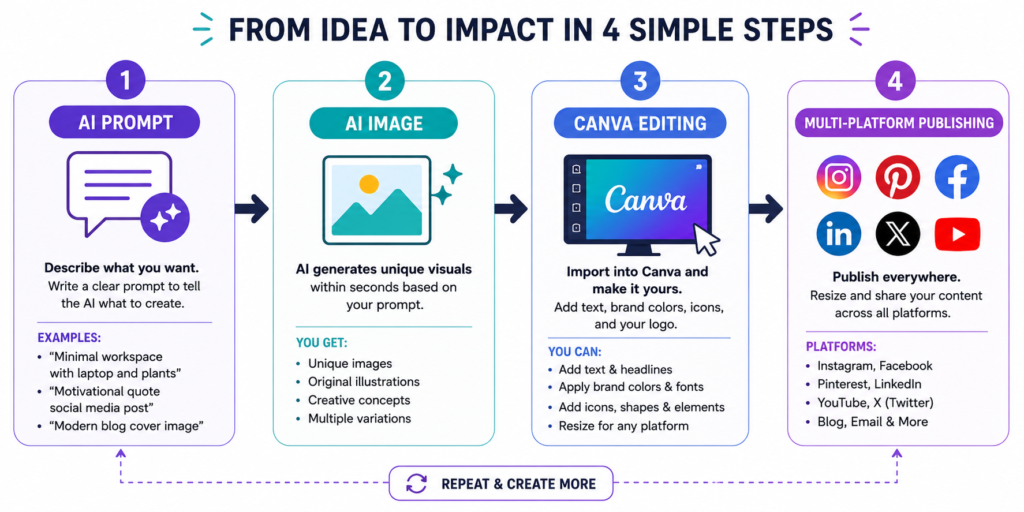
Here’s the workflow many successful creators now use.
Step 1
Generate unique illustrations using an AI image generator.
Step 2
Import the image into Canva.
Step 3
Add:
- Headlines
- Icons
- Branding
- Logo
- Call-to-action
- Background shapes
Step 4
Resize for:
- Blog
This hybrid workflow combines AI creativity with Canva’s editing flexibility.
💡 Pro Tip: Don’t rely on AI to finish every design. Use AI for ideas and unique visuals, then polish everything inside Canva. This gives you professional-looking graphics while keeping your branding consistent.
Common Mistakes to Avoid
Many beginners lose time because they use the wrong tool for the job.
Avoid these mistakes:
- ❌ Using AI to recreate a simple template
- ❌ Spending hours rewriting prompts
- ❌ Ignoring brand colors and fonts
- ❌ Creating inconsistent designs across platforms
- ❌ Downloading low-resolution graphics
Instead, let each tool do what it does best.
Which Tool Is Best for Different Users?
Beginner Bloggers
Winner: Canva
Templates make publishing much easier.
Pinterest Creators
Winner: Canva
Bulk pin creation is faster and more organized.
Freelancers
Winner: Combination
Generate concepts with AI and finalize projects in Canva.
YouTubers
Winner: AI + Canva
Create unique thumbnails using AI, then add text and branding in Canva.
Digital Product Sellers
Winner: Canva
Planners, ebooks, worksheets, templates, and lead magnets are much easier to produce consistently.
So… Which One Actually Saves You Time?
The answer depends on your task.
Choose Canva if you:
- Create social media graphics regularly
- Need brand consistency
- Love templates
- Design ebooks and digital products
- Want an all-in-one editor
Choose AI design tools if you:
- Need original artwork
- Want fresh visual ideas
- Create marketing concepts
- Make custom illustrations
- Prefer prompt-based workflows
For most creators, the real productivity boost comes from combining both.
AI generates the creative foundation, while Canva refines it into polished, on-brand content.
Final Thoughts
You don’t have to choose between Canva and AI design tools—they’re better together. Canva remains unbeatable for fast editing, branding, and templates, while AI excels at generating fresh ideas and original visuals in seconds.
Start by testing the hybrid workflow in your next project. If it saves you time, you’ll wonder how you ever worked without it.
Did you find this guide helpful? Share it on Pinterest, leave a comment with your favorite design tool, or download our free AI Prompt Pack to speed up your content creation even more!
Frequently Asked Questions (FAQs)
1. Is Canva better than AI design tools?
It depends on your needs. Canva is better for editing templates, maintaining brand consistency, and creating social media graphics, presentations, and digital products. AI design tools are better for generating original images, illustrations, and creative concepts quickly. Many creators achieve the best results by using both together.
2. Can AI replace Canva?
Not completely. AI can generate images and design ideas in seconds, but Canva provides powerful editing features, brand management, templates, and resizing tools that AI generators often lack. AI works best as a creative assistant, while Canva remains an excellent platform for polishing and publishing designs.
3. What are the best AI design tools in 2026?
Some of the most popular AI design tools include:
- Microsoft Designer
- Adobe Express AI
- ChatGPT Image Generation
- Midjourney
- Ideogram
- Leonardo AI
Each tool has different strengths, so choose one based on your workflow and content needs.
4. Is Canva worth paying for?
Yes. If you regularly create blog graphics, Pinterest pins, social media posts, presentations, ebooks, or marketing materials, Canva Pro can save hours every week with premium templates, Brand Kit, Magic Resize, background removal, and AI-powered features.
5. Which tool is best for beginner bloggers?
For beginners, Canva is usually the best choice because of its intuitive drag-and-drop editor and ready-made templates. As your content strategy grows, adding AI design tools can help you generate unique visuals faster.
6. Can I use AI-generated images in Canva?
Absolutely. You can create images with an AI image generator, upload them into Canva, and then add text, logos, icons, and brand colors. This hybrid workflow is one of the fastest ways to produce professional-looking graphics.
7. Which is faster for creating Pinterest pins?
Canva is generally faster because it offers thousands of Pinterest-ready templates, built-in resizing, and easy customization. AI tools can generate unique artwork, but Canva makes it easier to turn that artwork into click-worthy pins.
8. What is the fastest workflow for content creators?
A simple workflow that saves time is:
- Write an AI prompt.
- Generate an original image with an AI tool.
- Import the image into Canva.
- Add headlines, branding, and icons.
- Resize and publish across your blog, Pinterest, Instagram, Facebook, LinkedIn, and YouTube.
This combination gives you the speed of AI with the flexibility of Canva.
9. Can I use Canva and AI design tools for commercial projects?
Yes. Both Canva and many AI design platforms offer commercial-use options, but licensing rules vary by platform and subscription plan. Always review the terms of use before selling products, publishing client work, or using generated images commercially.
10. Which tool should freelancers and small business owners choose?
If you create marketing materials regularly, Canva is the better everyday tool. If you frequently need unique product images, advertising concepts, or custom illustrations, adding an AI design tool to your workflow can significantly boost productivity.