Best AI Tools for Freelancers in 2026 (Free & Paid)
Freelancing offers the freedom to work from anywhere, choose your clients, and build your own business. However, managing multiple projects, writing proposals, researching information, communicating with clients, and meeting deadlines can take up a significant amount of time.
This is where artificial intelligence (AI) tools can help.
Today, freelancers can use AI to brainstorm ideas, write content, create graphics, research topics, organize projects, edit videos, and automate repetitive tasks. The right tools can make everyday work more manageable and help independent professionals focus on delivering quality work to their clients.
Whether you’re a freelance writer, graphic designer, virtual assistant, web developer, blogger, or consultant, there are AI tools that can support your workflow.
In this guide, we’ll explore the 10 best AI tools for freelancers in 2026, including their main features, practical uses, benefits, and limitations. We’ll also look at free options and explain how to choose the right tools for your freelance business.
Why Should Freelancers Use AI Tools?
Freelancers often manage several business responsibilities without a dedicated team. They handle client communication, research, project planning, marketing, and service delivery themselves.
AI tools can assist with many of these tasks.
Here are some practical benefits:
- Save time: Speed up repetitive tasks such as drafting emails, summarizing documents, and organizing information.
- Improve productivity: Get help with brainstorming, planning, and managing projects.
- Support creativity: Generate ideas for articles, graphics, presentations, and marketing campaigns.
- Improve communication: Draft professional client emails, proposals, and follow-up messages.
- Simplify research: Find useful information and organize research sources.
- Support business growth: Spend less time on routine administration and more time developing services and finding clients.
AI is a support tool, not a replacement for professional skills. Freelancers should review AI-generated work for accuracy, originality, quality, and client requirements.
10 Best AI Tools for Freelancers in 2026
Here are ten useful AI tools, selected for different freelance tasks rather than treating every tool as suitable for everyone.
1. ChatGPT – Best All-in-One AI Assistant
ChatGPT is a versatile AI assistant that can help freelancers with writing, brainstorming, research, planning, data analysis, and problem-solving.
It can be useful at almost every stage of a freelance project.
What can freelancers do with ChatGPT?
- Write client proposals and professional emails.
- Generate blog post ideas and content outlines.
- Create social media captions.
- Brainstorm business and marketing strategies.
- Summarize documents and reports.
- Analyze spreadsheets and organize information.
- Generate ideas for digital products.
Example: A freelance writer can ask ChatGPT to create a detailed blog outline based on a target audience, search intent, and primary keyword. The writer can then research, develop, and edit the article.
Advantages:
- Supports many different freelance tasks.
- Useful for brainstorming and drafting.
- Can work with uploaded files and supported data formats.
- Offers a free option, with additional capabilities on paid plans.
Limitations: AI-generated information can be inaccurate or generic. Always verify facts and add your own expertise.
Best for: Freelance writers, bloggers, virtual assistants, consultants, and general freelancers.
2. Claude – Best for Long-Form Writing and Document Analysis
Claude, developed by Anthropic, is an AI assistant that can help with writing, editing, analysis, coding, and working with documents.
It is especially useful for freelancers who handle detailed briefs, lengthy reports, research documents, and complex written projects.
What can freelancers do with Claude?
- Draft and edit long-form articles.
- Summarize lengthy client documents.
- Improve writing clarity and structure.
- Brainstorm content strategies.
- Review proposals and reports.
- Assist with coding and technical explanations.
Example: A freelance content writer receives a detailed client brief. Claude can help organize the requirements, identify key sections, and create a structured first draft.
Advantages:
- Helpful for document-heavy workflows.
- Can assist with nuanced writing and editing.
- Useful for research and analysis.
Limitations: It can still misunderstand instructions or produce incorrect information. Review important work before sending it to clients.
Best for: Freelance writers, editors, consultants, and researchers.
3. Google Gemini – Best for Google Workspace Users
Website: https://gemini.google.com/
Google Gemini is an AI assistant that can help with brainstorming, writing, learning, research, and problem-solving.
It can be particularly useful for freelancers who already work with Google’s ecosystem.
Depending on the available plan and integrations, Gemini can support workflows involving Google products.
What can freelancers do with Gemini?
- Brainstorm blog topics.
- Draft emails and business content.
- Summarize information.
- Generate marketing ideas.
- Help understand spreadsheets and documents.
- Support research and planning.
Example: A virtual assistant can use Gemini to brainstorm a weekly content calendar and organize ideas before adding them to a project document.
Advantages:
- Useful for everyday writing and brainstorming.
- Fits naturally into Google-oriented workflows.
- Supports different types of information and tasks.
Limitations: Available features and integrations vary by plan, account, and region. Verify important facts independently.
Best for: Virtual assistants, bloggers, freelancers, and professionals using Google Workspace.
4. Perplexity AI – Best for Online Research
Website: https://www.perplexity.ai/
Research is an important part of freelance work. Writers need reliable sources, marketers need industry information, and consultants need to understand trends.
Perplexity AI is an AI-powered search and research tool that provides answers with links to sources.
What can freelancers do with Perplexity?
- Research topics for blog articles.
- Find supporting information.
- Explore industry trends.
- Compare products and services.
- Collect references for reports.
- Discover different perspectives on a topic.
Example: A freelance blogger writing about productivity software can use Perplexity to discover relevant sources, compare features, and identify information that needs further verification.
Advantages:
- Provides source links with its answers.
- Useful for exploring unfamiliar topics.
- Helps organize preliminary research.
Limitations: Citations do not automatically guarantee accuracy. Open the original sources and verify important claims.
Best for: Freelance writers, bloggers, researchers, and digital marketers.
5. Canva AI – Best for Graphic Design and Visual Content
Website: https://www.canva.com/
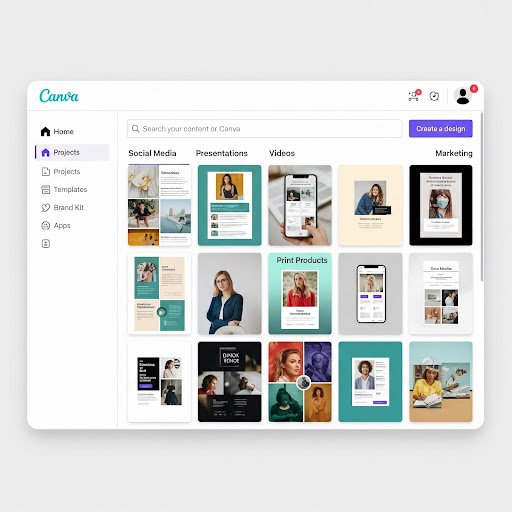
Canva is a popular design platform that helps freelancers create professional-looking visual content without needing advanced graphic design skills.
Its AI-powered features, including Magic Studio tools, can assist with creating and adapting designs.
What can freelancers create with Canva?
- Social media posts.
- Pinterest pins.
- Blog featured images.
- Business presentations.
- eBook covers.
- Marketing materials.
- Digital planners and templates.
- Client proposals and portfolios.
Example: A freelance social media manager can use Canva to create a collection of Instagram post templates for a small business.
Advantages:
- Beginner-friendly design interface.
- Ready-made templates.
- AI-assisted design features.
- Useful for creating multiple content formats.
Limitations: Some advanced features and assets require a paid plan. Always check licensing conditions before selling designs or templates.
Best for: Graphic designers, social media managers, bloggers, and digital product creators.
6. Grammarly – Best for Grammar and Professional Writing
Website: https://www.grammarly.com/
Clear communication is essential for freelancers working with international clients.
Grammarly helps improve written communication by identifying grammar, spelling, punctuation, clarity, and tone issues.
Its AI writing features can also assist with drafting and rewriting.
What can freelancers do with Grammarly?
- Correct grammar and spelling.
- Improve sentence clarity.
- Check writing tone.
- Refine client emails.
- Polish proposals and reports.
- Improve professional communication.
Example: A freelancer can draft an email to a client and use Grammarly to identify unclear sentences and improve the tone before sending it.
Advantages:
- Useful for everyday professional writing.
- Helps identify common writing mistakes.
- Offers browser and document integrations.
Limitations: It may suggest changes that alter your intended meaning. Review suggestions instead of accepting every correction.
Best for: Freelance writers, virtual assistants, bloggers, and anyone who communicates with clients in English.
7. Fireflies.ai – Best for Meeting Notes and Summaries
Website: https://fireflies.ai/
Freelancers often attend discovery calls, project meetings, and client discussions.
Fireflies.ai is an AI meeting assistant that can record, transcribe, summarize, and help search meeting conversations.
What can freelancers do with Fireflies.ai?
- Create meeting transcripts.
- Generate meeting summaries.
- Identify action items.
- Review important discussion points.
- Search previous meeting conversations.
- Prepare follow-up notes.
Example: After a client discovery call, a freelancer can review the meeting summary to identify project requirements, deadlines, and agreed next steps.
Advantages:
- Reduces manual note-taking.
- Helps organize meeting information.
- Makes it easier to revisit discussions.
Limitations: Check recording consent requirements and applicable privacy laws before recording meetings. Transcripts may also contain errors.
Best for: Consultants, virtual assistants, agencies, coaches, and freelancers who attend regular client meetings.
8. Descript – Best for Video and Audio Editing
Website: https://www.descript.com/
Video and audio content have become important parts of digital marketing.
Descript offers AI-assisted audio and video editing features, including transcript-based editing.
It can help creators edit recordings by working with their transcripts instead of relying entirely on a traditional editing timeline.
What can freelancers do with Descript?
- Edit video and podcast recordings.
- Create transcripts.
- Remove unwanted sections.
- Improve recorded content.
- Prepare videos for social media.
- Repurpose longer recordings into shorter content.
Example: A freelance video editor can use Descript to edit an interview, remove unnecessary sections, and prepare shorter clips for social media.
Advantages:
- Useful for audio and video workflows.
- Transcript-based editing can simplify certain tasks.
- Helps with content repurposing.
Limitations: Advanced editing may still require a traditional video editor. Check plan limits and export options.
Best for: Video editors, podcasters, YouTube creators, and content marketers.
9. Zapier – Best for Workflow Automation
Website: https://zapier.com/
Freelancers often repeat the same administrative tasks, such as saving form submissions, sending notifications, updating spreadsheets, and organizing client information.
Zapier helps connect different applications and automate workflows. Its AI-related features can also support automation tasks.
What can freelancers automate?
- Save new form submissions to a spreadsheet.
- Send notifications when a client submits a request.
- Organize information between connected applications.
- Create automated follow-up workflows.
- Connect business applications.
- Reduce repetitive administrative work.
Example: A freelancer can create an automation that adds a new website enquiry to a spreadsheet and sends a notification when a potential client submits a contact form.
Advantages:
- Connects many business applications.
- Reduces repetitive manual work.
- Useful for organizing small business workflows.
Limitations: Some automations require paid plans, and complex workflows need testing and maintenance.
Best for: Virtual assistants, consultants, marketers, and freelancers managing recurring processes.
10. GitHub Copilot – Best for Freelance Developers
Website: https://github.com/features/copilot
Freelance developers often spend considerable time writing code, understanding existing projects, fixing errors, and testing applications.
GitHub Copilot is an AI coding assistant designed to help developers work within supported coding environments.
What can freelance developers do with GitHub Copilot?
- Generate code suggestions.
- Complete code while typing.
- Explain unfamiliar code.
- Help identify potential errors.
- Assist with debugging.
- Generate tests and documentation.
Example: A freelance web developer can use Copilot to generate a starting point for a common function and then review, test, and modify the code for the client’s project.
Advantages:
- Supports coding workflows.
- Can speed up routine programming tasks.
- Helpful for understanding and documenting code.
Limitations: Generated code can contain bugs, security issues, or licensing concerns. Review and test all code before using it in production.
Best for: Freelance web developers, software engineers, and programmers.
AI Tools for Freelancers: Quick Comparison
| AI Tool | Best Use | Suitable Freelancer |
|---|---|---|
| ChatGPT | Writing and general assistance | All freelancers |
| Claude | Long-form writing | Writers and consultants |
| Google Gemini | Google-oriented workflows | Virtual assistants |
| Perplexity | Research | Bloggers and researchers |
| Canva AI | Graphic design | Designers and marketers |
| Grammarly | Writing improvement | Writers and professionals |
| Fireflies.ai | Meeting summaries | Consultants and agencies |
| Descript | Audio and video editing | Video creators |
| Zapier | Workflow automation | Virtual assistants |
| GitHub Copilot | Coding | Developers |
Best Free AI Tools for Freelancers
If you’re starting freelancing with a limited budget, you don’t need to purchase several subscriptions immediately.
You can begin by exploring the free options offered by different platforms.
Here is a practical starter selection:
| Tool | What to Try |
|---|---|
| ChatGPT | Brainstorming and drafting |
| Claude | Writing and document assistance |
| Google Gemini | Ideas and research support |
| Perplexity | Source-backed research |
| Canva | Basic visual designs |
| Grammarly | Grammar and spelling support |
| Fireflies.ai | Meeting transcription options |
| Descript | Basic audio and video editing options |
| Zapier | Simple workflow automations |
Free plans often have usage limits, feature restrictions, or changing eligibility. Check each provider’s current plan details before relying on a feature for client work.
How to Choose the Right AI Tools for Your Freelance Business
Choosing the right AI tools is more important than collecting as many subscriptions as possible.
Follow these steps to build a useful AI toolkit.
1. Identify Your Biggest Time-Consuming Tasks
Start by listing the activities that take up most of your working hours.
For example:
- Writing articles and proposals.
- Creating graphics.
- Researching information.
- Managing client meetings.
- Editing videos.
- Organizing projects.
Choose tools that directly address these tasks.
2. Start with Free Plans
Explore free versions before paying for subscriptions.
Test each tool using real tasks from your freelance business. Check whether the output is useful, accurate, and easy to edit.
3. Compare Features and Limitations
Before choosing a tool, consider:
- Available features.
- Usage limits.
- Ease of use.
- Integration with your existing software.
- Privacy and data handling.
- Subscription costs.
- Export and file options.
4. Protect Client Information
Never upload confidential client documents, personal information, passwords, or sensitive business data without checking the relevant privacy terms and obtaining appropriate permission.
Follow your client agreements and applicable data protection requirements.
5. Measure Whether the Tool Saves Time
Try a tool on a real task and compare the time required with your previous workflow.
If a paid tool does not provide enough value, consider cancelling it or switching to a free alternative.
How Freelancers Can Use AI Tools Together
The biggest advantage often comes from combining a few tools into a simple workflow.
Here are three practical examples.
Example 1: Freelance Content Writer
- Use Perplexity to discover research sources.
- Use ChatGPT or Claude to brainstorm and organize an article outline.
- Write and edit the article using your own expertise.
- Use Grammarly to check grammar and clarity.
- Use Canva to create the featured image.
Example 2: Freelance Graphic Designer
- Use ChatGPT to brainstorm design concepts.
- Use Canva to create initial designs.
- Refine the layouts and visual elements.
- Check the final designs against the client’s brand guidelines.
- Prepare the final files for delivery.
Example 3: Virtual Assistant
- Use ChatGPT to draft professional client emails.
- Use Fireflies.ai to summarize permitted client meetings.
- Use Zapier to automate suitable repetitive tasks.
- Use Grammarly to review important messages.
- Organize project information in a suitable workspace.
These workflows are starting points. Choose tools based on your clients’ requirements and your actual work process.
Common Mistakes to Avoid When Using AI Tools
AI tools can be helpful, but using them incorrectly can create problems.
Avoid these common mistakes:
1. Publishing AI-generated content without editing
Always review facts, add original insights, and make sure the final content genuinely helps the reader.
2. Paying for too many subscriptions
Start with a small collection of tools. Add another subscription only when you have a clear business need.
3. Trusting every AI-generated answer
AI can misunderstand questions or produce incorrect information. Verify important facts before using them in client work.
4. Ignoring client privacy
Protect confidential information and understand how each service handles uploaded data.
5. Forgetting your own professional skills
Clients pay for reliable results, expertise, communication, and problem-solving—not simply AI-generated output.
Frequently Asked Questions
1. What are the best AI tools for freelancers in 2026?
Some useful options include ChatGPT, Claude, Google Gemini, Perplexity, Canva AI, Grammarly, Fireflies.ai, Descript, Zapier, and GitHub Copilot. The best choice depends on your freelance profession and the tasks you need help with.
2. Which AI tools are free for freelancers?
Several platforms offer free plans or limited free access, including ChatGPT, Claude, Gemini, Perplexity, Canva, Grammarly, and others. Features and usage limits vary, so check the official pricing pages.
3. Can AI tools help freelancers earn more money?
AI tools can help freelancers work more efficiently, improve their services, and manage repetitive tasks. However, they do not guarantee more clients or higher earnings. Results depend on skills, service quality, pricing, and marketing.
4. Which AI tool is best for freelance writers?
ChatGPT and Claude are useful for brainstorming, drafting, and editing. Perplexity can support research, while Grammarly helps improve grammar and clarity.
5. Which AI tool is best for graphic designers?
Canva AI is a practical option for creating social media graphics, presentations, and marketing designs. Professional designers may also use other specialized design software depending on their projects.
6. Can beginners use AI tools for freelancing?
Yes. Many AI tools have beginner-friendly interfaces and free options. Beginners should learn how to use them responsibly and develop professional skills alongside them.
7. Do freelancers need paid AI subscriptions?
Not necessarily. Free plans may be sufficient for many beginners. Upgrade only when a paid feature solves a recurring problem or provides clear value to your business.
Final Thoughts
AI tools are becoming useful companions for freelancers in 2026. They can help with writing, research, design, meetings, video editing, coding, and everyday business administration.
However, you don’t need every AI tool available.
Start with one general-purpose assistant, such as ChatGPT or Claude, and add specialized tools based on your freelance work. A writer may benefit from Perplexity and Grammarly, while a designer may prefer Canva. A developer may find GitHub Copilot more useful.
The key is to use AI to improve your workflow while maintaining your own creativity, professional judgment, and quality standards.
Choose the right tools, keep learning, and focus on delivering better results for your clients.
Disclaimer: AI features, availability, free-plan limits, and subscription prices can change. Visit the official websites for the latest information before purchasing a subscription.